


Every Monday morning, the product team at a 45-person B2B software company faces the same breakdown. Marketing needs the new landing page builder "urgently" for next month's campaign. Sales is screaming about the CRM integration that's "costing us deals daily." Support wants the bug fix dashboard because "customers are furious." Meanwhile, the CEO just promised a major client a custom feature by quarter-end.
How competing priorities derail teams and destroy operational efficiency
The product manager tries to explain they only have capacity for two of these. Everyone insists theirs can't wait. The meeting ends with vague promises to "figure it out," which really means the loudest voice wins and half the work gets done poorly.
This pattern destroys operational efficiency across departments. Not because people are unreasonable, but because there's no clear mechanism to arbitrate between genuinely competing priorities when everyone believes their need is critical.
Why urgency inflation becomes the default negotiation tactic
A department head learns that calling something "urgent" gets it done faster. Soon, everything becomes urgent. Once one team plays this game, others have to match the escalation or watch their legitimate needs get buried.
Eliminate team chaos and missed deadlines.
Temsly helps you assign, track & complete projects efficiently with full visibility.
- Centralized task management
- Real-time team communication
- Resource and deadline tracking
No credit card required
Marketing discovers that saying "this will impact revenue" moves their request up the queue. Sales counters with "we're losing deals without this." Support brings out "customer churn risk." Engineering tries to hold the line but eventually caves to whoever applies the most pressure or has the CEO's ear that week.
Some requests genuinely are urgent. But when everything carries the same urgency label, you lose the ability to distinguish between a server outage affecting all customers and a nice-to-have feature request dressed up as critical.
The downstream effects compound quickly. Teams start padding their urgency claims. A two-week delay becomes "catastrophic." A minor inconvenience becomes "blocking our entire workflow." Trust erodes between departments. People stop believing each other's assessments of importance.
This creates a culture where being honest about priority puts you at a disadvantage. If you accurately describe your request as "important but not urgent," it goes to the bottom of the pile while the team crying wolf gets served first.
The operational cost of unclear priorities
A mid-sized marketing agency tracked what happened when they operated without clear priority mechanisms for six months. The numbers were brutal.
Their development team spent roughly 40% of their time on "urgent" requests that delivered minimal business value. One example: they rushed a client portal feature because account management insisted it was "critical for retention." Three months later, only 2 out of 47 clients had even logged in.
Meanwhile, genuinely important work sat untouched. A workflow automation that would have saved the operations team 15 hours per week got pushed back four times because it couldn't compete with the constant stream of "emergencies."
The hidden costs went beyond wasted development time. Project managers spent hours in priority negotiation meetings. Department heads got pulled into escalation discussions. The CEO became a bottleneck, having to personally arbitrate between competing demands because there was no other mechanism.
Team morale tanked. Developers felt like they were constantly fighting fires instead of building meaningful features. Department heads felt unheard when their legitimate needs got deprioritized. Everyone felt like they were losing, which, operationally, they were.
Building a priority scoring rubric that actually works
Here's a rubric that's worked across multiple organizations:
| Criteria | 1 Point | 2 Points | 3 Points | 4 Points | 5 Points |
|---|---|---|---|---|---|
| Impact | Individual/team level | Department level | Multiple departments | Company-wide | Market/regulatory |
| Urgency | Can wait 3+ months | Can wait 2-3 months | Can wait 1 month | Can wait 1-2 weeks | Must start this week |
| Effort | 100+ hours | 50-100 hours | 25-50 hours | 10-25 hours | Under 10 hours |
| Strategic Alignment | Nice to have | Supports goals | Advances key goals | Critical for goals | Competitive necessity |
You multiply Impact × Urgency × Strategic Alignment, then divide by Effort. This gives you a priority score between 1 and 125. Anything below 20 probably shouldn't be done. Anything above 60 is genuinely important.
What makes this work operationally: you require specific evidence for each score. Someone claiming 5 for urgency? They need to show the specific deadline or quantify the daily cost of delay. Claiming 5 for impact? Show the number of affected customers or the revenue at risk. No evidence means the score defaults to 2.
This rubric alone won't solve everything. People will still try to game it. That's where the arbitration flow comes in.
The arbitration flow for competing priorities
When two departments both score their requests above 60, you need a clear escalation path that doesn't just punt the decision upward. Here's a flow that prevents the CEO from becoming the default referee:
Round 1: Peer Negotiation
The two department heads meet without mediators. They have 30 minutes to either:
-
Agree on sequencing (one goes first, then the other)
-
Find a compromise solution that partially addresses both needs
-
Agree to bundle the requests if there's overlap
About 40% of conflicts resolve here when people are forced to actually discuss trade-offs directly.
Round 2: Options Development
If peer negotiation fails, both parties work with the delivery team to develop three options:
-
Option A Do request 1 first (with specific timeline and impact on request 2)
-
Option B Do request 2 first (with specific timeline and impact on request 1)
-
Option C A creative alternative (partial delivery, different approach, etc.)
Each option must include concrete implications. Not "this will delay marketing goals" but "this will push the campaign launch from March 15 to April 10, potentially reducing Q1 lead generation by approximately 200 leads."
Round 3: Stakeholder Committee
A standing committee of 3-5 senior people reviews the options. This isn't the executive team – it's usually a mix of operations, finance, and product leadership who understand resource constraints.
They choose based on:
-
Total business impact across all three options
-
Resource efficiency
-
Risk to critical business functions
-
Strategic alignment with quarterly priorities
The committee decision is final for that quarter. No end-runs to the CEO. No revisiting unless genuinely new information emerges.
Here's a visual of the arbitration workflow.
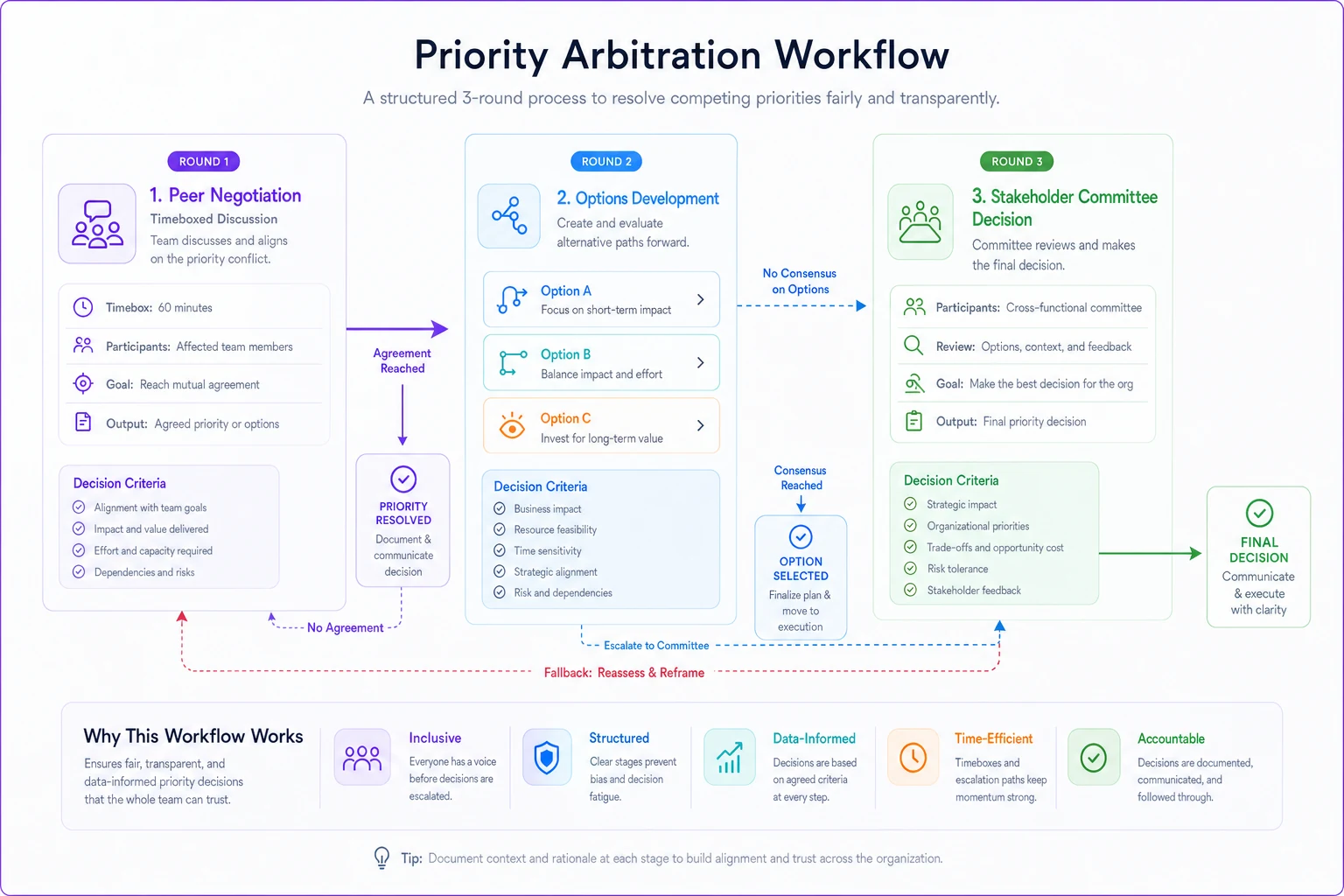
This diagram summarizes the three-round arbitration flow and where decisions are made.
Negotiation scripts that defuse urgency games
The hardest part is actually having these conversations without damaging relationships. Here are scripts that have worked in real operations:
When someone claims everything is urgent: "I hear that this feels critical for your team. Help me understand the specific impact if we delayed by two weeks. What would actually break or be lost? Let's put real numbers to it so we can compare against other requests fairly."
When someone tries to bypass the process: "I get why you'd want to escalate this directly. The challenge is that when we make exceptions, we end up dropping something else that went through proper scoring. Can we run this through the rubric first? If it truly scores as critical, it'll get prioritized quickly."
When two departments are in deadlock: "You both have legitimate needs here. Rather than fight over who goes first, let's map out what each timeline looks like. What's the smallest piece of each request we could deliver to unblock both teams partially?"
When someone inflates their scoring: "I see you've scored this as a 5 for urgency. Walk me through the specific deadline or daily cost that justifies that score. If we can't quantify it, we should probably score it as a 3 to be fair to other requests."
When the CEO tries to jump the queue: "I understand this is important to you. If we prioritize this, we'll need to delay [specific project] which scored higher on our rubric. Are you comfortable with that trade-off, or should we run this through the normal scoring first?"
These scripts work because they redirect the conversation from emotional urgency to operational trade-offs. They force specificity without being confrontational.
Making the system stick operationally
Implementation is where most priority systems fail. Teams agree to the rubric in theory, then abandon it at the first sign of pressure.
Start with a pilot between two departments that already have a decent relationship. Usually product and marketing, or operations and finance. Run the system for one quarter with just these teams. Work out the kinks before rolling it out company-wide.
Document every priority decision and its outcome. Three months later, review which "urgent" requests actually delivered the promised value. This retrospective data becomes powerful evidence for why the system matters.
Create a simple tracking spreadsheet that shows:
-
Original priority score
-
What was promised (timeline, impact)
-
What actually happened
-
Whether the urgency was justified in hindsight
Start with a pilot between two departments that already have a decent relationship.
One company found that 65% of their "urgent" requests could have waited two weeks with zero negative impact. Showing this data to teams helped them calibrate their scoring better.
The arbitration committee needs teeth. Their decisions must be final, and the CEO must publicly support the process even when they disagree with specific outcomes. The moment the CEO overrides the committee for political reasons, the system loses all credibility.
Set clear windows for priority reviews. Maybe it's every two weeks or monthly. Outside these windows, new requests queue up unless they meet specific emergency criteria (system down, legal requirement, major customer at risk). This prevents the constant negotiation that exhausts everyone.
Common failure patterns to avoid
The most common failure: making the rubric too complex. One company created a 15-factor scoring system that required an hour to complete. Nobody used it. Keep it to 4-5 factors maximum.
Another failure pattern: not adjusting the rubric based on what you learn. If everything scores between 40-60, your rubric isn't differentiating enough. Adjust the scoring weights or criteria until you get meaningful spread.
Some organizations try to automate this too early. They build elaborate scoring apps before they've proven the process works manually. Start with a simple spreadsheet. Once the cultural habit is established, then consider automation tools.
The "emergency escape hatch" problem is real. Teams learn that calling something a security issue or compliance risk bypasses the system. You need clear definitions of what constitutes a genuine emergency versus what goes through normal scoring.
Leadership commitment wobbles kill these systems fast. The first time an executive's pet project gets deprioritized, they'll want to override the system. This is the critical moment. If leadership caves, you might as well not have a process at all.
When this approach makes sense (and when it doesn't)
This system works well for organizations with 20-200 employees where multiple departments compete for shared resources. Below 20 people, you probably don't need this formality. Above 200, you need more sophisticated portfolio management.
It's particularly valuable when you have:
-
Shared technical or creative resources serving multiple departments
-
History of priority conflicts damaging relationships
-
Leaders who currently spend too much time arbitrating between teams
-
Track record of urgent requests that didn't deliver promised value
This approach doesn't work if your organization genuinely operates in constant crisis mode. If you're a startup fighting for survival or a company mid-acquisition, everything might actually be urgent. Fix the existential threats first, then implement priority management.
It also fails if leadership isn't willing to accept some short-term friction. The first few times someone's previously "urgent" request gets deprioritized, they'll be upset. Leadership needs to hold firm through this adjustment period.
The payoff of clear prioritization
A design agency implemented this exact system after losing two major developers who burned out from constant urgency. Six months later, their operational metrics showed remarkable improvement.
Development velocity increased by roughly 30% because developers could focus on single projects instead of context-switching between "emergencies." Project completion rates went from around 60% to 85% because fewer initiatives got abandoned mid-stream for the next urgent request.
The culture shifted. Department heads started collaborating on bundled requests that served multiple needs. The phrase "urgent" almost disappeared from internal communication. Teams began planning further ahead because they trusted the priority system to handle their needs fairly.
The CEO reclaimed about 6 hours per week previously spent mediating priority disputes. Project managers spent less time in escalation meetings and more time actually managing delivery. The whole organization operated more smoothly because everyone understood how priority decisions got made.
Building this into your operational flow
The transition from chaos to clear prioritization doesn't happen overnight. Start by acknowledging that your current system (or lack thereof) isn't working. Get buy-in from key stakeholders that something needs to change.
Run a retrospective on your last quarter's "urgent" requests. How many were truly urgent? How many delivered the promised value? Use this data to build the case for a more structured approach.
Introduce the rubric gradually. Start by scoring requests retroactively to calibrate the system. Then use it for new requests while maintaining your old process as a backup. Only fully switch over once teams are comfortable with the scoring.
Train people on the negotiation scripts. Role-play common scenarios. Make it safe to push back on urgency claims. The first few times someone successfully defuses an urgency game using these scripts, celebrate it publicly.
AI-powered operational software can help track and automate parts of this process. These platforms can analyze historical priority decisions to suggest scores, flag when requests seem inflated, and automatically route conflicts through the arbitration flow. The software particularly helps by creating an audit trail of decisions and outcomes, making it harder for people to game the system over time.
Start with the human process first. Get people comfortable with structured prioritization, then layer in technology to reduce the administrative burden. Automation works best when it's enhancing an already-functional human workflow, not trying to fix a broken culture.
Your priority conflicts won't disappear entirely. But they'll transform from political battles into operational discussions. Instead of whoever shouts loudest winning, decisions get made based on clear criteria and documented trade-offs. Teams spend less time fighting over resources and more time delivering value.
The urgency game ends when you make the rules explicit and the consequences clear. Not through executive decree or complex systems, but through simple rubrics, clear arbitration, and scripts that redirect emotional urgency toward operational reality.
The urgency game ends when you make the rules explicit and the consequences clear. Not through executive decree or complex systems, but through simple rubrics, clear arbitration, and scripts that redirect emotional urgency toward operational reality.
Ready to elevate your team's performance?
Join 2,000+ teams using Temsly to streamline workflows, boost productivity, and deliver projects on time.