



Most team leaders think their delivery problems come from people issues. Someone's not pulling their weight. Communication breakdown. Priorities keep shifting. After building operational software for hundreds of teams, the pattern becomes obvious — teams without proper operating systems always fail the same way.
The marketing team commits to twelve campaigns while engineering quietly builds features nobody asked for. Sales promises custom work that operations can't actually deliver. Three departments work on competing solutions to the same problem because nobody tracks what's already in flight.
A team operating system isn't about adding more process. It's creating repeatable patterns that connect intake to delivery without constant firefighting. Teams that ship predictably versus teams that constantly scramble? It comes down to having these patterns documented and followed.
Why intake without structure creates organizational chaos
Every request starts somewhere. A customer complaint escalates through support. Sales spots a competitive gap during a demo. The CEO reads about a new trend and wants immediate action. Without structured intake, these requests scatter across email threads, Slack messages, hallway conversations, and random meetings.
-
Direct messages to team leads
-
Comments in random documents
-
Meeting action items buried in notes
-
Customer success escalation emails
-
Sales deal blockers mentioned casually
-
Executive "quick favors"
Each channel had its own implied urgency. Each requester assumed their ask was being tracked somewhere. The development team was simultaneously working on seventeen different "top priorities" because every intake source created its own shadow queue.
Smaller teams have it worse. In a 200-person company, you might have dedicated intake processes for major departments. In a 20-person startup, the same engineer might field requests from sales, support, marketing, and the CEO — all before lunch.
The four-phase operating system that actually works
High-performing teams versus constant scramblers? The pattern is remarkably consistent. Teams need four connected phases with clear handoffs between each:
Eliminate team chaos and missed deadlines.
Temsly helps you assign, track & complete projects efficiently with full visibility.
- Centralized task management
- Real-time team communication
- Resource and deadline tracking
No credit card required
Phase 1: Structured Intake Everything flows through defined channels. Not bureaucracy — clear paths for different request types. Emergency fixes go through one flow. Feature requests through another. Strategic initiatives through a third. Each path has its own template, timeline, and decision criteria.
Phase 2: Transparent Prioritization Requests get scored, stacked, and sequenced based on explicit criteria everyone understands. Not just "business value" — actual scoring dimensions like customer impact, technical complexity, strategic alignment, and resource requirements. The scoring happens where stakeholders can see why their request ranked where it did.
Phase 3: Committed Execution Once something makes it through prioritization, execution follows a standard pattern. Clear ownership. Defined milestones. Regular check-ins. Standard escalation paths when things go sideways. Same execution framework whether you're shipping a product feature or planning an office move.
Phase 4: Systematic Retrospective Every major deliverable gets a structured review. What worked. What broke. What should change for next time. These insights feed back into the operating system, gradually improving intake criteria, prioritization weights, and execution patterns.
Between each phase sits a governance checkpoint — a deliberate pause to verify readiness before moving forward. These aren't approval meetings. They're quality gates that prevent half-baked ideas from consuming resources.
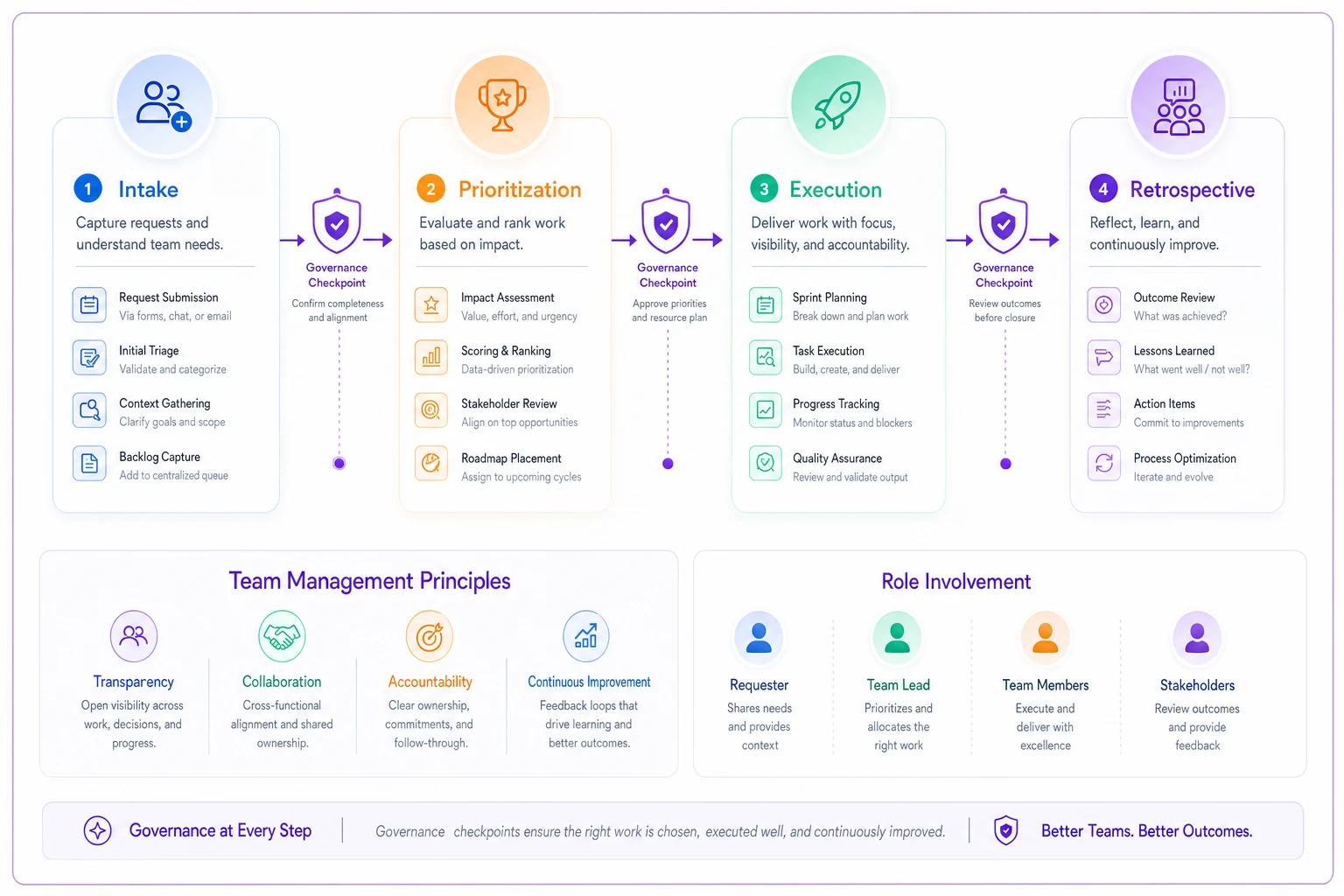
Here's a simple visual to keep in mind as you map your team's flow.
Building your intake system without creating bureaucracy
The worst thing you can do is create an intake process that feels like filling out government forms. Teams will immediately route around it, and you'll be back to shadow requests within a week.
-
Quick fixes (under 4 hours of work)
-
Standard requests (1-10 days of effort)
-
Strategic initiatives (multi-week projects)
Each channel needs exactly three things:
-
A single entry point (form, email alias, or designated person)
-
A simple template that captures context, success criteria, and urgency
-
A service-level agreement for initial response
One software development team started with one shared spreadsheet with four columns: Request, Requester, Business Reason, and Date Submitted. That was it. Within two weeks, they could see all requests in one place. Within a month, they added scoring. Within a quarter, they had cut their "emergency" requests by 60% because requesters could see their ask alongside everything else.
Start with a shared spreadsheet with minimal columns to capture requests quickly before investing in tooling.
The templates don't need complexity:
Quick Fix Template:
-
What's broken
-
Who's affected
-
Workaround available? (yes/no)
-
Requested by when
Standard Request Template:
-
Problem we're solving
-
Success looks like
-
Who benefits
-
Dependencies or blockers
-
Ideal timeline
Strategic Initiative Template:
-
Business outcome we're chasing
-
How we'll measure success
-
Resources required (people, budget, time)
-
Risks if we don't do this
-
Alternative approaches considered
You'll quickly discover that most "urgent" requests aren't actually urgent once people have to articulate why they need something by Tuesday instead of Friday.
Prioritization that survives contact with reality
Most prioritization systems fail because they try to be too sophisticated. Weighted scoring across twelve dimensions. Complex formulas. Elaborate voting mechanisms. Then an executive makes one comment and the whole framework gets tossed out.
The prioritization system that actually sticks has three layers:
Layer 1: Binary Filters Before scoring anything, apply simple yes/no filters:
-
Is this legally required? → Goes to the top
-
Will something break if we don't do this? → High priority queue
-
Do we have the skills to execute this? → If no, stop here
-
Is the requester willing to provide resources? → If no, back to requester
These filters kill roughly 30% of requests immediately. Legal requirements go straight through. Missing skills get flagged for hiring or training decisions. Requesters who won't commit support get their requests bounced.
Layer 2: Simple Scoring Score what makes it through filters on just three dimensions:
-
Customer impact (1-5)
How many customers affected and how severely
-
Effort required (1-5)
Total resource investment needed
-
Strategic fit (1-5)
Alignment with current quarter objectives
The formula stays dead simple: (Customer Impact × Strategic Fit) ÷ Effort Required
Layer 3: Reality Checks Before finalizing priorities, run three checks:
-
Can the assigned team actually do this given current commitments?
-
Are the dependencies ready or will this get blocked?
-
Is the requester prepared to support this through completion?
One operations team discovered that 40% of their "high-priority" requests failed the dependency check. The work was important, but prerequisite systems weren't ready. By catching this during prioritization instead of mid-execution, they eliminated most of their blocked work.
Execution frameworks that prevent mid-flight disasters
Execution fails when handoffs break down. The requirements seemed clear during planning, but three weeks in, nobody remembers what "integration with the inventory system" actually meant. The designer thought they were creating mockups. The developer started building. Neither talked to the inventory team.
Standard execution needs five documented elements:
| Role | Person | Responsible For | Success Criteria |
|---|---|---|---|
| Project Lead | Single named person | Overall delivery | On time, on scope |
| Technical Lead | Domain expert | Solution quality | Meets requirements, no critical bugs |
| Business Sponsor | Requester/stakeholder | Requirements clarity | Accepts final output |
| Execution Team | 2-5 contributors | Actual work | Tasks completed per timeline |
2. Definition of Done Not philosophical. Specific checkboxes:
-
Code reviewed and merged
-
Documentation updated
-
Tests passing
-
Deployed to staging
-
Sponsor signed off
-
Handoff materials created
3. Checkpoint Rhythm
-
Daily
Quick blockers check (5 minutes)
-
Weekly
Progress against plan (15 minutes)
-
Milestone
Deeper review at 25%, 50%, 75% complete
-
Pre-launch
Final readiness review
4. Escalation Triggers Define exactly when to raise flags:
-
Blocker unresolved for 48 hours → Escalate to project lead
-
Timeline slipping by more than 20% → Escalate to sponsor
-
Scope creep exceeding 15% → Full team review required
-
Key person unavailable for 3+ days → Resource reallocation meeting
5. Communication Protocols
-
Updates go in one designated channel/tool
-
Status follows consistent format
-
Decisions get documented within 24 hours
-
Changes require written confirmation from sponsor
The point isn't rigid process adherence. It's having clear agreements about how work flows so nothing falls through cracks.
Governance checkpoints that actually prevent problems
Governance sounds heavy, but done right, these checkpoints take less than 30 minutes and prevent weeks of wasted work.
Checkpoint 1: Intake → Prioritization Gate Before scoring any request:
-
Is the problem clearly defined?
-
Do we understand the success criteria?
-
Has the requester committed support?
A simple checklist. If any answer is "no," the request goes back for clarification. This gate alone eliminates about a third of poorly-defined requests.
Checkpoint 2: Prioritization → Execution Gate Before starting work:
-
Are requirements documented and agreed?
-
Do we have committed resources?
-
Are dependencies mapped and ready?
-
Has the execution team confirmed feasibility?
Checkpoint 3: Mid-Execution Health Check At the 40-50% mark:
-
Is original timeline still realistic?
-
Any scope changes since start?
-
Are stakeholders engaged as needed?
-
Any new risks or blockers?
Checkpoint 4: Pre-Launch Readiness Before any release:
-
Does output match requirements?
-
Are handoff materials complete?
-
Is rollback plan documented?
-
Have affected teams been notified?
Checkpoint 5: Retrospective Trigger After delivery:
-
Did we hit our success criteria?
-
What broke that we didn't expect?
-
What should change in our process?
-
What patterns should we watch for?
Each checkpoint produces a simple output: proceed, pause for fixes, or stop and reassess. No lengthy deliberations. Quick verification that we're not about to waste everyone's time.
The rollout sequence that doesn't overwhelm your team
Dropping a complete operating system on a team guarantees rejection. Roll out in phases that build on each other:
-
Week 1-2
Intake Only
Start capturing all requests in one place. Don't change how anything gets prioritized or executed. Let the team see the volume and variety of what's coming at them. Most teams are shocked when they realize they're juggling 3-4x more requests than they thought. -
Week 3-4
Add Simple Prioritization
Apply basic scoring to the now-visible backlog. Don't enforce it yet — just let people see how their requests rank against everything else. You'll immediately spot the problems: everything scoring as "critical," effort estimates wildly off, strategic alignment unclear. -
Week 5-8
Run Parallel Execution
Pick 2-3 new requests and run them through the structured execution framework while everything else continues as normal. Document what breaks. Adjust the templates. Get comfortable with the checkpoint rhythm. -
Week 9-12
Full System, Limited Scope
Run the complete operating system for one team or one project type. Iron out the kinks before expanding. Create successful patterns others want to copy, not force compliance. -
Week 13+
Gradual Expansion
Other teams start adopting elements that work for them. The intake system spreads because people want visibility. The prioritization framework gets referenced in planning meetings. The execution templates become "how we do things."
Other teams start adopting elements that work for them. The intake system spreads because people want visibility. The prioritization framework gets referenced in planning meetings. The execution templates become "how we do things."
Ready-to-copy templates that work immediately
Basic Intake Form Request Title: [What do you need?] Requester: [Your name and team] Problem/Opportunity: [Why does this matter?] Success Criteria: [How do we know when we're done?] Ideal Timeline: [When do you need this?] Resources Available: [What can you contribute?]
Prioritization Scorecard Request: Customer Impact (1-5): _ Effort Required (1-5): _ Strategic Fit (1-5): _ Score: (Impact × Strategic) ÷ Effort = __ Dependencies Ready? Y/N Team Available? Y/N Proceed? Y/N
Execution Checkpoint Project: Date: Percentage Complete: ____% On Track? Y/N Blockers: [List any] Scope Changes: [List any] Next Milestone: [Date and deliverable] Need Help With: [Specific asks]
Retrospective Framework Project: Original Goal: [What we set out to do] Actual Outcome: [What actually happened] Timeline: Planned days, Actual _ days What Went Well: [2-3 things to repeat] What Went Wrong: [2-3 things to fix] Process Changes: [Specific adjustments to make]
Copy these exactly or adapt them for your context. The important part is having something written down that everyone follows.
Making the system stick when everything wants to break it
The gravitational pull toward chaos is strong. Urgent requests will try to skip the intake process. Executives will want to override prioritization. Teams will skimp on retrospectives when things get busy.
First, make the system faster than the alternatives. If going through proper intake takes three days while a Slack message to the right person takes three minutes, guess which one wins? Set aggressive service-level agreements for initial response. Quick fixes get acknowledged within 2 hours. Standard requests within 24 hours. Make the official channel the fastest channel.
Second, show the cost of exceptions. Track every request that skips the process. At month end, calculate the disruption cost — interrupted work, context switching, delayed projects. One team found that "quick favors" that bypassed intake consumed 30% of their engineering capacity. Making this visible changed behavior overnight.
Third, automate the tedious parts. Modern operational platforms can automatically route requests, score priorities, trigger checkpoints, and generate status updates. When AI automation handles administrative overhead, teams focus on actual decision-making instead of process compliance.
Fourth, celebrate wins publicly. When the operating system prevents a disaster — catching a dependency issue early, stopping scope creep, avoiding overcommitment — make sure everyone knows. Share specific examples in team meetings. "Because we caught this in our prioritization gate, we saved two weeks of wasted development."
Common failure patterns and how to prevent them
Pattern 1: The Zombie Process The team goes through the motions but doesn't actually follow the system. Intake forms get filled out after work starts. Prioritization happens but gets ignored. Retrospectives become box-checking exercises.
Prevention: Measure system usage weekly. What percentage of work went through intake? How many priorities got overridden? How many retrospective insights led to process changes? When usage drops below 80%, something's broken.
Pattern 2: The Bloated System What started simple grows into a monster. Intake forms expand to 30 fields. Prioritization requires six approval levels. Execution checkpoints multiply until they consume more time than the actual work.
Prevention: Set hard limits. Intake forms: maximum 6 fields. Prioritization: maximum 3 scoring dimensions. Checkpoints: maximum 15 minutes each. Review and prune quarterly.
Pattern 3: The Shadow System Teams create their own simplified versions that don't connect to the main system. Marketing runs their own priority list. Engineering tracks different metrics. Sales has a separate request channel.
Prevention: Allow customization within the framework. Teams can adjust templates for their context, but core elements stay consistent — everything flows through intake, uses compatible prioritization, follows similar execution patterns.
Your operating system should bend without breaking. When teams start creating workarounds, understand why instead of enforcing compliance.
When automation transforms the operating system
The manual version of this system works, but it requires constant attention. Someone has to check the intake queue. Someone else updates priority scores. A third person schedules checkpoints and chases down updates. It's sustainable but exhausting.
This is where operational software with built-in automation changes everything. AI agents can classify incoming requests, suggest priority scores based on historical patterns, and automatically schedule checkpoints. They spot when projects drift off track before humans notice. They generate status updates from activity data instead of interrupting people for reports.
A consulting firm implemented their team operating system manually first, then added automation six months later. The manual version improved their delivery predictability by about 40%. Adding AI automation pushed it past 70% while reducing administrative overhead by roughly 25 hours per week.
The automation doesn't replace human judgment. It eliminates the coordination overhead that makes operating systems fail. When intake automatically routes to the right reviewer, when priorities automatically recalculate as new information arrives, when checkpoints automatically appear on calendars — the system becomes self-sustaining instead of another burden to manage.
Your next four weeks
Week 1: Audit your current chaos. Track every request for five days. Note where they come from, how they get prioritized (if at all), and what percentage actually ship successfully. This baseline will shock you.
Week 2: Implement basic intake. One form, one location, maximum six fields. Don't worry about perfection. Start capturing demand in a single stream.
Week 3: Add
This playbook gives you the core patterns to turn chaos into predictable delivery. Start small, measure usage, and iterate with feedback from real work.
Ready to elevate your team's performance?
Join 2,000+ teams using Temsly to streamline workflows, boost productivity, and deliver projects on time.