


Three weeks into a product feature build, your engineering lead messages you: "Hey, quick question about the user permissions logic for this feature. Should admins be able to override the automated approval flow, or does everything go through the standard process?"
You stare at the message. The feature's halfway built. Nobody talked about admin overrides. The product manager assumed one thing, engineering built another, and now you're looking at either rushing a hacky solution or eating another week of development time to rebuild it properly.
This scenario repeats constantly across software teams. Not because people aren't communicating—they are. Teams lack a consistent acceptance criteria template and review process that catches these gaps before code gets written. Without that structure, everyone fills in the blanks with their own assumptions.
Why acceptance criteria breaks down between disciplines
Most teams write acceptance criteria like a wish list. Product managers describe what they want users to experience. Engineers translate that into technical requirements. QA interprets both documents differently. Each discipline operates from their own perspective.
A product manager writes: "Users should be able to export their data." Seems clear enough.
Engineering assumes CSV format because that's standard. Product actually meant PDF reports for client presentations. QA tests the CSV export thoroughly. Two weeks later, during stakeholder review, someone asks about the PDF formatting options that don't exist.
The breakdown happens because acceptance criteria often lives in different formats across teams. Product uses user stories in Jira. Engineering maintains technical specs in Confluence. Design has Figma annotations. QA keeps test cases in TestRail. Each document tells part of the story, but nobody sees the complete picture until something breaks.
Cross-functional teams make this worse. A marketing automation feature needs input from product, engineering, marketing, legal, and data teams. Each group speaks their own language. Marketing talks about "customer journeys." Engineering discusses "event triggers." Legal mentions "consent management." They're describing the same feature from different angles, but without a shared acceptance criteria template, these perspectives never properly align.
The acceptance criteria template that actually prevents rework
After watching teams rebuild features repeatedly, one pattern works consistently: a lightweight template that forces cross-discipline clarity without becoming bureaucratic overhead.
Eliminate team chaos and missed deadlines.
Temsly helps you assign, track & complete projects efficiently with full visibility.
- Centralized task management
- Real-time team communication
- Resource and deadline tracking
No credit card required
Core Acceptance Criteria Structure:
1. User Context (2-3 sentences max) Who's using this and why. Not a user story—just enough context so everyone understands the purpose.
2. Success Conditions (numbered list) What must be true when this feature ships. Each condition should be testable and unambiguous.
3. Explicit Exclusions What this feature specifically does NOT do. This section prevents scope creep more than any other.
4. Cross-Discipline Checkpoints
| Discipline | Key Question | Answer | Reviewer |
|---|---|---|---|
| Engineering | API changes needed? | Yes/No + details | Tech lead |
| Design | New components required? | Yes/No + details | Design lead |
| Data | Tracking events needed? | Yes/No + details | Analytics |
| Legal | Compliance considerations? | Yes/No + details | Legal rep |
| QA | Test environment needs? | Yes/No + details | QA lead |
5. Edge Cases & Decisions
-
What happens when [specific scenario]?
-
How do we handle [error state]?
-
What's the fallback for [edge case]?
6. Dependencies & Blockers
-
Needs X to be completed first
-
Blocked by Y decision
-
Requires access to Z system
The template above keeps things short and forces explicit answers to common gaps teams miss.
Real Example: Automated Invoice Reminders
Real Example: Automated Invoice Reminders
User Context: Small business owners need automated payment reminders sent to clients with overdue invoices, reducing manual follow-up work.
Success Conditions:
-
System sends first reminder 3 days after due date
-
Admin can customize reminder email template
-
Client can pay directly from reminder email
-
System logs all reminder activity in invoice history
-
Reminders stop automatically when payment received
Explicit Exclusions:
-
No SMS reminders (email only for v1)
-
No partial payment handling
-
No multi-language support yet
-
No reminder scheduling customization per client
Cross-Discipline Checkpoints:
| Discipline | Key Question | Answer | Reviewer |
|---|---|---|---|
| Engineering | API changes needed? | Yes - payment webhook updates | Tom K. |
| Design | New components required? | Yes - email template editor | Sarah L. |
| Data | Tracking events needed? | Yes - reminder sent/opened/clicked | Mike R. |
| Legal | Compliance considerations? | Check email regulations per region | Legal |
| QA | Test environment needs? | Need test payment processor | QA team |
Edge Cases:
-
Invalid email? → Log error, notify admin, skip reminder
-
Payment made during reminder queue? → Cancel pending reminder
-
Email bounces? → Mark as undeliverable, alert admin after 3 bounces
Dependencies:
-
Email service provider API integration (completed)
-
Payment processor webhook setup (in progress)
This concrete example shows how the template maps to a real feature and prevents common misunderstandings.
The 15-minute pre-development review that catches 80% of issues
Templates alone don't prevent rework. You need a review ritual that actually happens—not another hour-long meeting that everyone dreads.
The most effective approach takes exactly 15 minutes and runs async-first:
Day -2: Async Review (24-hour window) ↓ Day -1: Clarification Thread (written Q&A) ↓ Day 0: Speed Review Call (15 minutes max) ↓ Development Ready
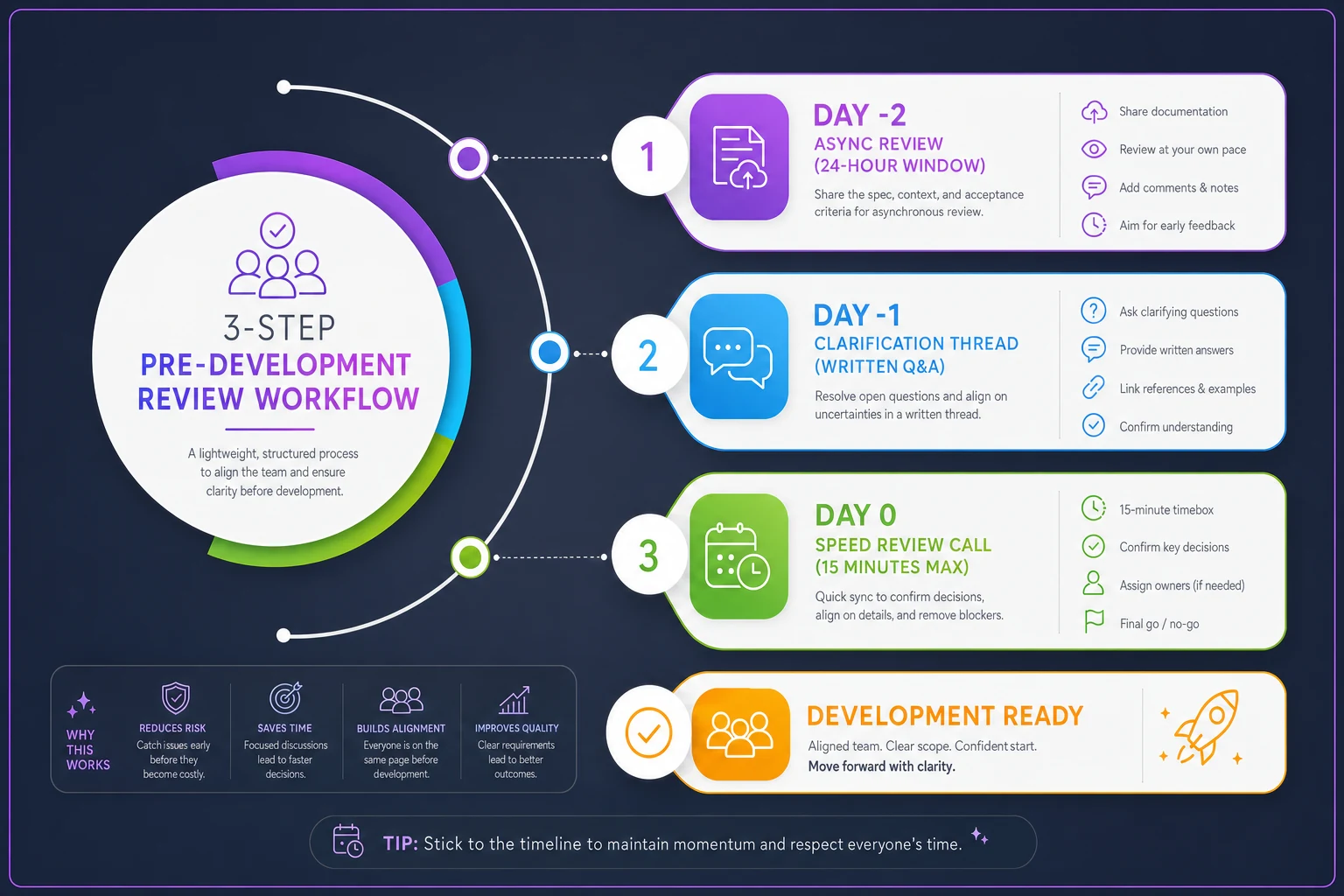
This diagram shows the short async-first workflow that surfaces questions early and keeps the final sync meeting brief.
Step 1: Async Review (Day -2) Post the acceptance criteria in Slack/Teams with a 24-hour review window. Tag specific people for their discipline's checkpoint.
Step 2: Clarification Thread (Day -1) Everyone posts questions directly in the thread. No meetings yet—just written clarifications. Product owner responds to all questions within the thread.
Step 3: Speed Review Call (Day 0, 15 minutes max) Only discuss unresolved questions from the thread. Timer visible to everyone. If you can't resolve something in 15 minutes, it's not ready for development.
This process seems almost too simple, but it works because async review lets people think before responding, written questions create documentation, and time pressure forces clarity over perfection.
One e-commerce platform team reduced their feature rework from around 40% of builds to under 10% after implementing this process. They track a simple metric: "features that required rebuilding core logic after development started."
Real examples from marketing, operations, and customer success teams
Marketing Team: Campaign Attribution Feature
A marketing team needed campaign attribution tracking across multiple channels. First version of acceptance criteria just said "track which campaigns drive conversions."
After applying the template:
Success Conditions:
-
System captures last-click attribution within 30-day window
-
Dashboard shows conversion by campaign source
-
Attribution data exports to Salesforce daily
-
UTM parameters automatically parsed from URLs
Explicit Exclusions:
-
No multi-touch attribution modeling
-
No offline campaign tracking
-
No real-time dashboard (daily refresh only)
The exclusions section prevented three weeks of engineering work on multi-touch attribution that marketing didn't actually need yet.
Operations Team: Inventory Threshold Alerts
An operations team wanted inventory alerts. Original request: "Alert when inventory is low."
After template application:
Success Conditions:
-
Alert triggers when item quantity drops below custom threshold
-
Alerts sent via email AND in-app notification
-
Different thresholds configurable per SKU
-
Alert includes direct reorder link
-
Snooze option for seasonal items
Edge Cases:
-
Negative inventory? → Immediate critical alert to ops manager
-
Bulk inventory update? → Suppress alerts for 1 hour
-
New SKU added? → Default to category-level threshold
This clarity prevented the classic "but I meant email AND app notifications" conversation after development.
Customer Success: Account Health Scoring
Customer success wanted an account health score. Initial criteria was dangerously vague: "Score accounts based on engagement and risk factors."
Structured version:
Success Conditions:
-
Score calculated daily using
login frequency (40%), feature usage (30%), support tickets (20%), payment history (10%)
-
Score displayed as 0-100 with color coding (red/yellow/green)
-
Score history tracked for trend analysis
-
Automated alert when score drops 20+ points in 7 days
Cross-Discipline Checkpoints:
| Discipline | Key Question | Answer |
|---|---|---|
| Data | Which events to track? | Login, feature clicks, ticket creation |
| Engineering | Real-time or batch? | Daily batch calculation at 2 AM |
| CS | Override capability? | Yes, with audit trail |
Without this structure, engineering would have built real-time scoring (unnecessary complexity) and CS would have discovered the missing override capability during UAT.
Common patterns where acceptance criteria fails (and the fix)
Pattern 1: The Permission Assumption
Every feature involving multiple user types stumbles here. Nobody explicitly defines who can do what.
Fix: Add a permissions matrix to your template:
| Action | Admin | Manager | User | Guest |
|---|---|---|---|---|
| View | ✓ | ✓ | ✓ | ✗ |
| Edit | ✓ | ✓ | Own only | ✗ |
| Delete | ✓ | ✗ | ✗ | ✗ |
Pattern 2: The State Machine Gap
Features with multiple states (draft, pending, approved, rejected) often miss state transition logic.
Fix: Map every possible state transition:
-
Draft → Pending
User submits
-
Pending → Approved
Manager approves
-
Pending → Rejected
Manager rejects with reason
-
Rejected → Draft
User can revise and resubmit
Pattern 3: The Integration Handwave
"Integrate with Salesforce" sounds simple until you realize there are 50 different ways to integrate with Salesforce.
Fix: Integration criteria must specify:
-
Data flow direction (one-way or bi-directional?)
-
Sync frequency (real-time, hourly, daily?)
-
Conflict resolution (which system wins?)
-
Field mapping (explicit field-by-field map)
Pattern 4: The Mobile Afterthought
Team assumes desktop-first, discovers mobile requirements during QA.
Fix: Every acceptance criteria needs a "Platform Behavior" section:
-
Desktop
Full functionality
-
Tablet
Same as desktop OR specify differences
-
Mobile
List any reduced/modified functionality
Addressing these patterns up front saves weeks of rebuilding and late-stage surprises.
Build your review ritual around natural team rhythms
The 15-minute review works, but only if it fits your team's existing schedule. Don't create another meeting—attach it to something that already exists.
For teams with sprint planning: Run the review 2 days before sprint planning. This gives you buffer time to clarify requirements before committing to sprint work.
For teams doing continuous deployment: Implement a "ready for dev" label that only gets applied after the review. Nothing moves to development without the label.
For cross-timezone teams: Make the async review 48 hours instead of 24. Run the sync discussion as a recorded Loom video that others can watch and comment on.
For small teams (under 5 people): Skip the async portion. Do a 10-minute standup review where each person verbally confirms their checkpoint.
Make it lightweight enough that people actually do it. A simple process that happens beats a perfect process that gets skipped.
Measuring if your acceptance criteria actually works
Track these numbers monthly:
Rework Rate: Features requiring significant logic changes after development starts Target: Under 15%
Clarification Requests: Questions from engineering during development Target: Under 3 per feature
QA Rejection Rate: Features failing QA due to requirement misunderstanding Target: Under 10%
Time to First Line of Code: Days from feature request to development start Should decrease over time as criteria gets clearer
One B2B SaaS company tracked these metrics for six months:
| Month | Rework Rate | Clarifications per Feature |
|---|---|---|
| Month 1 | 38% | 8.2 |
| Month 3 | 22% | 4.1 |
| Month 6 | 11% | 2.3 |
They saved around 30% of their engineering time just by preventing rework. That's like adding another developer to the team without hiring anyone.
When acceptance criteria becomes overhead (and what to do)
Some teams try this and create 10-page requirement documents for every tiny feature. That's missing the point entirely.
Size your criteria to the risk:
Low Risk (under 3 dev days):
-
5-8 success conditions
-
Skip cross-discipline checkpoints
-
List only critical edge cases
Medium Risk (3-10 dev days):
-
Full template
-
All checkpoints
-
Major edge cases documented
High Risk (over 10 dev days):
-
Full template plus
-
Architectural review
-
Prototype or proof of concept
-
Customer validation before build
Feature types that need minimal criteria:
-
Bug fixes (unless changing behavior)
-
Copy changes
-
Style updates
-
Internal tools with single user
Feature types that need complete criteria:
-
Payment processing changes
-
User permission systems
-
Integration features
-
Customer-facing workflows
-
Data migration processes
Size the documentation to the risk so the process remains useful instead of burdensome.
Software automation that manages acceptance criteria across teams
Manual acceptance criteria management gets messy fast. Documents scatter across tools. Review feedback lives in Slack threads. Nobody knows which version is current.
AI-powered operational software can centralize this entire process. Instead of copying templates between documents, the system maintains a single source of truth for each feature's requirements. When product updates a success condition, engineering sees it immediately. When QA adds an edge case, it appears in the same view everyone else uses.
The automation also handles the review workflow. It triggers the async review automatically, collects feedback in one place, and schedules the sync discussion when needed. No more chasing people for approvals or wondering if everyone saw the latest changes.
AI agents can analyze your acceptance criteria for common gaps too. They spot missing permission definitions, flag vague success conditions, and identify when integration details are underspecified. This pattern recognition improves over time, learning from your team's specific blind spots.
Teams using centralized acceptance criteria management report 50% less time spent in clarification meetings, 70% fewer post-development requirement changes, and a clear audit trail for every requirement decision. The software essentially acts as a requirements coordinator, ensuring nothing falls through the cracks between disciplines.
Start with one team, one template, one sprint
Don't revolutionize your entire organization's requirement process next Monday. That's how good ideas die.
Pick one team. Use the template for one feature in the next sprint. Run the 15-minute review once. Measure what happens.
Most teams see immediate results: fewer clarification questions, less rework, happier developers who actually understand what they're building before they start.
Once that first team proves the value, other teams naturally adopt the process. They see the reduced chaos and want the same clarity for their work.
The acceptance criteria template isn't about creating more documentation. It's about preventing the expensive confusion that happens when smart people make different assumptions. Every hour spent clarifying requirements saves roughly 5-10 hours of rework later. That math alone justifies the effort. But the real value comes from shipping features that actually work the first time, keeping your team focused on building new value instead of fixing old assumptions.
Start small, keep it lightweight, and make clarity the default. The result is fewer surprises, less rework, and a team that spends more time building and less time backtracking.
Ready to elevate your team's performance?
Join 2,000+ teams using Temsly to streamline workflows, boost productivity, and deliver projects on time.